# Homepage

API Documentation for Parcel Public API v2

Welcome to the API documentation for Parcel Public API v2! Here, you'll find all the essential information to kickstart your integration of Parcel into your applications or open-source projects.

{% hint style="info" %}
Before you can make requests towards the Public API, you need to create an API Key.

[How do I create an API Key?](/obtain-api-key/create-an-api-key)
{% endhint %}

{% content-ref url="/pages/6GY3lNUXSjExiSB98QIh" %}
[Hub Endpoints](/hub-endpoints/fetch-hub-information)
{% endcontent-ref %}

{% content-ref url="/pages/mL2qtEXWjXWV6eVBF9aS" %}
[Product Endpoints](/product-endpoints/fetch-product-information)
{% endcontent-ref %}

{% content-ref url="/pages/1gUMlmqqx9FZYV5Jhjtf" %}
[Whitelist Endpoints](/whitelist-endpoints/check-whitelist)
{% endcontent-ref %}

Should you need assistance, feel free to reach out via the Discord server or Customer Support tab available in the sidebar.

Enjoy your exploration!

<figure><img src="https://3296878771-files.gitbook.io/~/files/v0/b/gitbook-x-prod.appspot.com/o/spaces%2FrE23lk3kkdfIlGb9B4Tf%2Fuploads%2Fvc9ZLPsp9IgJHrRewtlY%2FParcel%20-%20Official%20Thumbnail%20Smallest%20-%20DarkYellow.png?alt=media&amp;token=54c24ed7-d403-4e77-a9a1-33cc32afe18a" alt=""><figcaption></figcaption></figure>


# Create an API Key

Create an API Key for your Parcel Hub

## How do API Keys work?

API keys are essential for interacting with our API. Here are some key points to understand:

* **Unique to Each Hub**: You can't use one API key for every task. Each hub has its own unique API key. You can only interact with the resources of the specified hub using its API key, not with any other hubs.
* **Daily Request Quota**: Each API key comes with a daily request quota. You can view this quota on the Developer Portal.

## How do I create an API Key?

Follow these steps to create an API key:

1. **Visit the Developer Portal**: Go to the [Developer Portal](https://developers.parcelroblox.com/).
2. **Navigate to the "Manage Keys" Page**: In the Developer Portal, find and click on the "Manage Keys" page.
3. **Select Your Hub**: There is a dropdown menu where you can see all the hubs/stores you have administrator privileges for. Select the hub for which you want to create an API key.
4. **Create the API Key**: Press the "Create API Key" button. The new API key will appear in the table below.
5. **Copy the API Key**: Press the "Copy Key" button next to the newly created API key. You’re all set!


# Fetch Hub Information

Retrieve information from your Hub

Retrieve comprehensive data related to your Hub. This endpoint fetches and returns a majority of the information stored in the database, facilitating a thorough understanding of your Hub's current state.

## Retrieve information from your Hub

<mark style="color:blue;">`GET`</mark> `https://v2.parcelroblox.com/hub`

#### Headers

<table><thead><tr><th width="256">Name</th><th width="170">Type</th><th>Description</th></tr></thead><tbody><tr><td>Authorization<mark style="color:red;">*</mark></td><td>string</td><td>prod_DGzVhVsrqNJi4b0Chd9mMPUI9</td></tr><tr><td>Content-Type</td><td>string</td><td>application/json</td></tr></tbody></table>

{% tabs %}
{% tab title="200: OK " %}
If everything was able to process properly:

```javascript
{ "status": "200", "message": "OK", "data": object }
```

{% endtab %}

{% tab title="500: Internal Server Error " %}
If something was wrong on our end:

```javascript
{ "status": "500", "message": "Internal Server Error" }
```

{% endtab %}

{% tab title="401: Unauthorized " %}
If you provided an invalid authorization key:

```javascript
{ "status": "401", "message": "Invalid authorization key." }
```

If you did not provide an authorization key:

```javascript
{ "status": "401", "message": "No authorization key was provided." }
```

{% endtab %}
{% endtabs %}


# Update Hub Information

Update information in your Hub

Modify specific attributes of your Hub's database entry. This endpoint allows for the alteration of one or more fields, providing a flexible means to keep your Hub's information current and accurate.

## Update information in your Hub

<mark style="color:purple;">`PATCH`</mark> `https://v2.parcelroblox.com/hub`

Example of how you have to pass the body parameters:

<img src="https://3296878771-files.gitbook.io/~/files/v0/b/gitbook-x-prod.appspot.com/o/spaces%2FrE23lk3kkdfIlGb9B4Tf%2Fuploads%2FccnPLheKn5cT5hRQmAqj%2Fpatch_hub_example.png?alt=media&amp;token=6a4338e3-9090-4382-8ff6-9fba3c44bed9" alt="" data-size="original">

#### Headers

<table><thead><tr><th width="256">Name</th><th width="170">Type</th><th>Description</th></tr></thead><tbody><tr><td>Authorization<mark style="color:red;">*</mark></td><td>string</td><td>prod_DGzVhVsrqNJi4b0Chd9mMPUI9</td></tr><tr><td>Content-Type</td><td>string</td><td>application/json</td></tr></tbody></table>

#### Request Body

| Name                              | Type   | Description                 |
| --------------------------------- | ------ | --------------------------- |
| description                       | string | Hub description             |
| groups.roblox.id                  | string | Roblox Group ID             |
| game.musicID                      | string | Roblox In-game Music ID     |
| settings.staffrole\_id            | string | Discord Staff Role ID       |
| settings.log\_channel             | string | Discord Log Channel ID      |
| settings.purchase\_channel        | string | Discord Purchase Channel ID |
| misc.short\_description           | string | Short description           |
| misc.terms                        | string | Terms of Service            |
| webstore.appearance.store\_banner | string | Webstore Banner (URL)       |

{% tabs %}
{% tab title="200: OK " %}
If everything was able to process properly:

```javascript
{ "status": "200", "message": "OK", "data": object }
```

{% endtab %}

{% tab title="400: Bad Request " %}
If you did not follow the schema:

```javascript
{ "status": "400", "message": "Your payload did not pass the Schema validation.", "error": string, "data": {} }
```

{% endtab %}

{% tab title="401: Unauthorized " %}
If you provided an invalid authorization key:

```javascript
{ "status": "401", "message": "Invalid authorization key." }
```

If you did not provide an authorization key:

```javascript
{ "status": "401", "message": "No authorization key was provided." }
```

{% endtab %}

{% tab title="500: Internal Server Error " %}
If something was wrong on our end:

```javascript
{ "status": "500", "message": "Internal Server Error" }
```

{% endtab %}
{% endtabs %}


# Fetch Product Information

Retrieve information from a Product

Retrieve detailed information of a specific product within your Hub. This endpoint provides a comprehensive view of a product's attributes, aiding in accurate data representation and management.

## Retrieve information from a Product (or list all products)

<mark style="color:blue;">`GET`</mark> `https://v2.parcelroblox.com/products/:product_id`

#### Path Parameters

| Name                                          | Type   | Description                                                     |
| --------------------------------------------- | ------ | --------------------------------------------------------------- |
| product\_id<mark style="color:red;">\*</mark> | string | Product ID or put "all"  to return all products within your Hub |

#### Headers

<table><thead><tr><th width="256">Name</th><th width="170">Type</th><th>Description</th></tr></thead><tbody><tr><td>Authorization<mark style="color:red;">*</mark></td><td>string</td><td>prod_DGzVhVsrqNJi4b0Chd9mMPUI9</td></tr><tr><td>Content-Type</td><td>string</td><td>application/json</td></tr></tbody></table>

{% tabs %}
{% tab title="200: OK " %}
If everything was able to process properly (specific product):

```javascript
{ "status": "200", "message": "OK", "data": object }
```

If everything was able to process properly (all products):

```javascript
{ "status": "200", "message": "OK", "data": { "amount": number, "products": array } }
```

{% endtab %}

{% tab title="500: Internal Server Error " %}
If something was wrong on our end:

```javascript
{ "status": "500", "message": "Internal Server Error" }
```

{% endtab %}

{% tab title="401: Unauthorized " %}
If you provided an invalid authorization key:

```javascript
{ "status": "401", "message": "Invalid authorization key." }
```

If you did not provide an authorization key:

```javascript
{ "status": "401", "message": "No authorization key was provided." }
```

{% endtab %}
{% endtabs %}


# Create a new Product

Create a new Product within your Hub

Initiate the creation of a new product within your hub, defining its attributes for seamless integration and management within your ecosystem. This endpoint facilitates the expansion of your product offerings in a structured manner.

## Create a new Product

<mark style="color:green;">`POST`</mark> `https://v2.parcelroblox.com/products/create`

#### Headers

<table><thead><tr><th width="256">Name</th><th width="170">Type</th><th>Description</th></tr></thead><tbody><tr><td>Authorization<mark style="color:red;">*</mark></td><td>string</td><td>prod_DGzVhVsrqNJi4b0Chd9mMPUI9</td></tr><tr><td>Content-Type</td><td>string</td><td>application/json</td></tr></tbody></table>

#### Request Body

| Name                                                     | Type          | Description                   |
| -------------------------------------------------------- | ------------- | ----------------------------- |
| name<mark style="color:red;">\*</mark>                   | string        | Product Name                  |
| description<mark style="color:red;">\*</mark>            | string        | Product Description           |
| developer\_product\_id<mark style="color:red;">\*</mark> | string        | Roblox Developer Product ID   |
| file<mark style="color:red;">\*</mark>                   | string        | File URL (or text message)    |
| onsale<mark style="color:red;">\*</mark>                 | boolean       | Product Sale Status           |
| role\_id<mark style="color:red;">\*</mark>               | string / null | Discord Buyer Role ID         |
| decal\_id<mark style="color:red;">\*</mark>              | string / null | Roblox Decal ID               |
| stock<mark style="color:red;">\*</mark>                  | string        | Product Stock                 |
| category<mark style="color:red;">\*</mark>               | string        | Product Category              |
| instructions<mark style="color:red;">\*</mark>           | string / null | Product Delivery Instructions |

#### Available Categories

```json
aviation, military, vehicles, maritime, healthcare, education, hospitality, retail, technology, industrial, urban, residential, other
```

{% tabs %}
{% tab title="200: OK " %}
If everything was able to process properly:

```javascript
{ "status": "200", "message": "OK", "data": { "state": "Product created", "product": object } }
```

{% endtab %}

{% tab title="400: Bad Request " %}
If you did not follow the schema:

```javascript
{ "status": "400", "message": "Your payload did not pass the Schema validation.", "error": string, "data": {} }
```

If the product name that you supplied is already registered:

```javascript
{ "status": "400", "message": "The name '' is already in-use.\nPlease use a different product name.", "data": {} }
```

If the Roblox Developer Product ID that you supplied does not exist:

```javascript
{ "status": "400", "message": "Developer Product ID could not be found.\nAre you sure that you've entered the correct developer product ID?\nPossible solution: Make sure the Developer Product exists in the Hub game.", "data": {} }
```

If you did not supply a Discord Buyer Role ID (Parcel Pro only):

```javascript
{ "status": "400", "message": "Missing role_id or invalid input.", "data": {} }
```

If you did not supply a Product Stock (Parcel Pro only):

```javascript
{ "status": "400", "message": "Missing stock or invalid input. Please respond with a number between 0-999 or unlimited.", "data": {} }
```

If you the Product Stock you supplied is not within the number range (Parcel Pro only):

```javascript
{ "status": "400", "message": "On the stock field, please respond with a number between 0-999.", "data": {} }
```

If you did not supply Product Delivery Instructions (Parcel Pro only):

```javascript
{ "status": "400", "message": "Missing instructions or invalid input.", "data": {} }
```

{% endtab %}

{% tab title="403: Forbidden " %}
If your current tier does not support certain fields:

```javascript
{ "status": "403", "message": "Access forbidden: Your tier (Parcel Free) does not allow configuring stock, instructions, or role_id.", "data": {} }
```

{% endtab %}

{% tab title="401: Unauthorized " %}
If you provided an invalid authorization key:

```javascript
{ "status": "401", "message": "Invalid authorization key." }
```

If you did not provide an authorization key:

```javascript
{ "status": "401", "message": "No authorization key was provided." }
```

{% endtab %}

{% tab title="500: Internal Server Error " %}
If something was wrong on our end:

```javascript
{ "status": "500", "message": "Internal Server Error" }
```

{% endtab %}
{% endtabs %}


# Update an existing Product

Update an existing Product within your Hub

Utilize this endpoint to modify one or more attributes of an existing product within your hub, ensuring its details are current and accurate. This flexible tool allows for precise amendments, enhancing your product management workflow.

## Update an existing Product

<mark style="color:purple;">`PATCH`</mark> `https://v2.parcelroblox.com/products/update/:product_id`

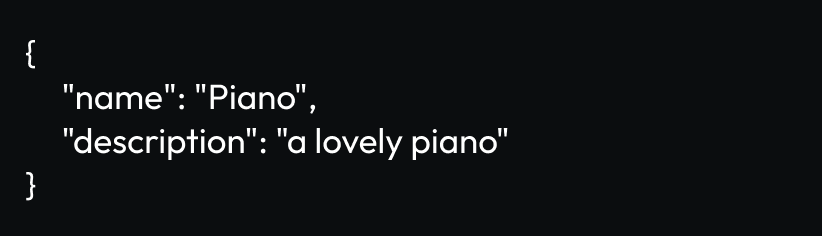
Example of how you have to pass the body parameters:

<img src="https://3296878771-files.gitbook.io/~/files/v0/b/gitbook-x-prod.appspot.com/o/spaces%2FrE23lk3kkdfIlGb9B4Tf%2Fuploads%2FEAsKMYm2a3muXSKll1cV%2Fpatch_product_example.png?alt=media&amp;token=85919221-6c7c-4721-b9e6-433c6d40d5d7" alt="" data-size="original">

#### Path Parameters

| Name                                          | Type   | Description |
| --------------------------------------------- | ------ | ----------- |
| product\_id<mark style="color:red;">\*</mark> | string | Product ID  |

#### Headers

<table><thead><tr><th width="256">Name</th><th width="170">Type</th><th>Description</th></tr></thead><tbody><tr><td>Authorization<mark style="color:red;">*</mark></td><td>string</td><td>prod_DGzVhVsrqNJi4b0Chd9mMPUI9</td></tr><tr><td>Content-Type</td><td>string</td><td>application/json</td></tr></tbody></table>

#### Request Body

| Name                   | Type          | Description                   |
| ---------------------- | ------------- | ----------------------------- |
| name                   | string        | Product Name                  |
| description            | string        | Product Description           |
| developer\_product\_id | string        | Roblox Developer Product ID   |
| file                   | string        | File URL (or text message)    |
| onsale                 | boolean       | Product Sale Status           |
| role\_id               | string / null | Discord Buyer Role ID         |
| decal\_id              | string / null | Roblox Decal ID               |
| stock                  | string        | Product Stock                 |
| category               | string        | Product Category              |
| instructions           | string / null | Product Delivery Instructions |

#### Available Categories

```json
aviation, military, vehicles, maritime, healthcare, education, hospitality, retail, technology, industrial, urban, residential, other
```

{% tabs %}
{% tab title="200: OK " %}
If everything was able to process properly:

```javascript
{ "status": "200", "message": "OK", "data": { "state": "Product updated", "changes": object } }
```

{% endtab %}

{% tab title="400: Bad Request " %}
If you did not follow the schema:

```javascript
{ "status": "400", "message": "Your payload did not pass the Schema validation.", "error": string, "data": {} }
```

If the product name that you supplied is already registered:

```javascript
{ "status": "400", "message": "The name '' is already in-use.\nPlease use a different product name.", "data": {} }
```

If the Roblox Developer Product ID that you supplied does not exist:

```javascript
{ "status": "400", "message": "Developer Product ID could not be found.\nAre you sure that you've entered the correct developer product ID?\nPossible solution: Make sure the Developer Product exists in the Hub game.", "data": {} }
```

If you did not supply a Product Stock (Parcel Pro only):

```javascript
{ "status": "400", "message": "Missing stock or invalid input. Please respond with a number between 0-999 or unlimited.", "data": {} }
```

If you the Product Stock you supplied is not within the number range (Parcel Pro only):

```javascript
{ "status": "400", "message": "On the stock field, please respond with a number between 0-999.", "data": {} }
```

{% endtab %}

{% tab title="401: Unauthorized " %}
If you provided an invalid authorization key:

```javascript
{ "status": "401", "message": "Invalid authorization key." }
```

If you did not provide an authorization key:

```javascript
{ "status": "401", "message": "No authorization key was provided." }
```

{% endtab %}

{% tab title="403: Forbidden " %}
If your current tier does not support certain fields:

```javascript
{ "status": "403", "message": "Access forbidden: Your tier (Parcel Free) does not allow configuring stock, instructions, or role_id.", "data": {} }
```

{% endtab %}

{% tab title="404: Not Found " %}
If the product ID that you supplied does not exist:

```javascript
{ "status": "404", "message": "Product does not exist.", "data": {} }
```

{% endtab %}

{% tab title="500: Internal Server Error " %}
If something was wrong on our end:

```javascript
{ "status": "500", "message": "Internal Server Error" }
```

{% endtab %}
{% endtabs %}


# Delete an existing Product

Delete an existing Product from your Hub

Utilize this endpoint to permanently remove an existing product from your hub. This action simplifies the management of your product catalog by discarding outdated or unwanted items, ensuring a streamlined and organized product selection.

## Delete an existing Product

<mark style="color:red;">`DELETE`</mark> `https://v2.parcelroblox.com/products/delete`

#### Headers

<table><thead><tr><th width="256">Name</th><th width="170">Type</th><th>Description</th></tr></thead><tbody><tr><td>Authorization<mark style="color:red;">*</mark></td><td>string</td><td>prod_DGzVhVsrqNJi4b0Chd9mMPUI9</td></tr><tr><td>Content-Type</td><td>string</td><td>application/json</td></tr></tbody></table>

#### Request Body

| Name                                          | Type   | Description |
| --------------------------------------------- | ------ | ----------- |
| product\_id<mark style="color:red;">\*</mark> | string | Product ID  |

{% tabs %}
{% tab title="200: OK " %}
If everything was able to process properly:

```javascript
{ "status": "200", "message": "OK", "data": { "state": "Product deleted", "product": { "id": string, "name": string } } }
```

{% endtab %}

{% tab title="401: Unauthorized " %}
If you provided an invalid authorization key:

```javascript
{ "status": "401", "message": "Invalid authorization key." }
```

If you did not provide an authorization key:

```javascript
{ "status": "401", "message": "No authorization key was provided." }
```

{% endtab %}

{% tab title="500: Internal Server Error " %}
If something was wrong on our end:

```javascript
{ "status": "500", "message": "Internal Server Error" }
```

{% endtab %}

{% tab title="404: Not Found " %}
If the product ID that you supplied does not exist:

```javascript
{ "status": "404", "message": "Product does not exist.", "data": {} }
```

{% endtab %}

{% tab title="400: Bad Request " %}
If you did not supply a Product ID:

```javascript
{ "status": "400", "message": "Missing Body Parameters.\nRequired params: product_id", "data": {} }
```

{% endtab %}
{% endtabs %}


# Check Whitelist

Verify a user's ownership of a product license

This endpoint facilitates the verification of user ownership for a specific product license within your hub. It's crucial for ensuring that only authorized users have access to particular products, maintaining a fair and secure environment for all participants.

## Check the Whitelist of a user

<mark style="color:blue;">`GET`</mark> `https://v2.parcelroblox.com/whitelist/check/:userid_type/:user_id`

#### Path Parameters

| Name                                           | Type   | Description               |
| ---------------------------------------------- | ------ | ------------------------- |
| userid\_type<mark style="color:red;">\*</mark> | string | "roblox" or "discord"     |
| user\_id<mark style="color:red;">\*</mark>     | string | Roblox or Discord User ID |

#### Query Parameters

| Name                                          | Type   | Description |
| --------------------------------------------- | ------ | ----------- |
| product\_id<mark style="color:red;">\*</mark> | String | Product ID  |

#### Headers

<table><thead><tr><th width="256">Name</th><th width="170">Type</th><th>Description</th></tr></thead><tbody><tr><td>Authorization<mark style="color:red;">*</mark></td><td>string</td><td>prod_DGzVhVsrqNJi4b0Chd9mMPUI9</td></tr><tr><td>Content-Type</td><td>string</td><td>application/json</td></tr></tbody></table>

{% tabs %}
{% tab title="200: OK " %}
If everything was able to process properly:

```javascript
{ "status": "200", "message": "OK", "data": { "userid": string, "userid_type": string, "product_id": string, "owns_license": boolean } }
```

{% endtab %}

{% tab title="401: Unauthorized " %}
If you provided an invalid authorization key:

```javascript
{ "status": "401", "message": "Invalid authorization key." }
```

If you did not provide an authorization key:

```javascript
{ "status": "401", "message": "No authorization key was provided." }
```

{% endtab %}

{% tab title="400: Bad Request " %}
If you did not supply a Product ID:

```javascript
{ "status": "400", "message": "Missing Query Parameter.\nRequired params: product_id", "data": {} }
```

{% endtab %}

{% tab title="500: Internal Server Error " %}
If something was wrong on our end:

```javascript
{ "status": "500", "message": "Internal Server Error" }
```

{% endtab %}

{% tab title="404: Not Found " %}
If the product ID that you supplied does not exist:

```javascript
{ "status": "404", "message": "Product does not exist.", "data": {} }
```

If the user ID that you supplied does not exist within our Database:

```javascript
{ "status": "404", "message": "No Roblox Account associated to this Discord User ID.", "data": {} }
```

{% endtab %}
{% endtabs %}


# Give Whitelist

Assign a product license to a user

This endpoint enables the assignment of a product license to a specified user within your hub. By utilizing this route, you can effectively distribute access to various products, ensuring that users receive the correct entitlements based on their permissions or purchases.

## Assign a Whitelist to a user

<mark style="color:green;">`POST`</mark> `https://v2.parcelroblox.com/whitelist/assign`

#### Headers

<table><thead><tr><th width="256">Name</th><th width="170">Type</th><th>Description</th></tr></thead><tbody><tr><td>Authorization<mark style="color:red;">*</mark></td><td>string</td><td>prod_DGzVhVsrqNJi4b0Chd9mMPUI9</td></tr><tr><td>Content-Type</td><td>string</td><td>application/json</td></tr></tbody></table>

#### Request Body

| Name                                           | Type   | Description               |
| ---------------------------------------------- | ------ | ------------------------- |
| product\_id<mark style="color:red;">\*</mark>  | string | Product ID                |
| userid<mark style="color:red;">\*</mark>       | string | Roblox or Discord User ID |
| userid\_type<mark style="color:red;">\*</mark> | string | "roblox" or "discord"     |

{% tabs %}
{% tab title="200: OK " %}
If everything was able to process properly:

```javascript
{ "status": "200", "message": "OK", "data": { "userid": string, "userid_type": string, "product_id": string, "state": "License has been assigned" } }
```

{% endtab %}

{% tab title="400: Bad Request " %}
If you did not supply the Product ID, User ID and User ID Type:

```javascript
{ "status": "400", "message": "Missing Body Parameters.\nRequired params: product_id, userid, userid_type", "data": {} }
```

If the user already owns the license:

```javascript
{ "status": "400", "message": "User already owns license.", "data": { } }
```

If you provided an invalid User ID Type:

```javascript
{ "status": "400", "message": "Invalid type.\nAvailable types: roblox, discord", "data": {} }
```

{% endtab %}

{% tab title="401: Unauthorized " %}
If you provided an invalid authorization key:

```javascript
{ "status": "401", "message": "Invalid authorization key." }
```

If you did not provide an authorization key:

```javascript
{ "status": "401", "message": "No authorization key was provided." }
```

{% endtab %}

{% tab title="500: Internal Server Error " %}
If something was wrong on our end:

```javascript
{ "status": "500", "message": "Internal Server Error" }
```

{% endtab %}

{% tab title="404: Not Found " %}
If the product ID that you supplied does not exist:

```javascript
{ "status": "404", "message": "Product does not exist.", "data": {} }
```

If the user ID that you supplied does not exist within our Database:

```javascript
{ "status": "404", "message": "No Roblox Account associated to this Discord User ID.", "data": {} }
```

{% endtab %}
{% endtabs %}


# Transfer Whitelist

Transfer a product license from a user to a different user

This endpoint facilitates the transfer of a product license from one user (User A) to another user (User B) within your hub. By executing this route, you can seamlessly reassign product access, ensuring that licenses are directed to the correct individuals.

## Transfer a license from one user to a different user

<mark style="color:purple;">`PATCH`</mark> `https://v2.parcelroblox.com/whitelist/transfer`

Example of how you have to pass the body parameters:

<img src="https://3296878771-files.gitbook.io/~/files/v0/b/gitbook-x-prod.appspot.com/o/spaces%2FrE23lk3kkdfIlGb9B4Tf%2Fuploads%2FJ7xDlpOiE9QCwqkZi0QS%2Fpatch_whitelist-transfer_example.png?alt=media&amp;token=1f4fda68-1fce-4357-8c24-b9dc69fb068e" alt="" data-size="original">

#### Headers

<table><thead><tr><th width="256">Name</th><th width="170">Type</th><th>Description</th></tr></thead><tbody><tr><td>Authorization<mark style="color:red;">*</mark></td><td>string</td><td>prod_DGzVhVsrqNJi4b0Chd9mMPUI9</td></tr><tr><td>Content-Type</td><td>string</td><td>application/json</td></tr></tbody></table>

#### Request Body

| Name                                                     | Type   | Description               |
| -------------------------------------------------------- | ------ | ------------------------- |
| product\_id<mark style="color:red;">\*</mark>            | string | Product ID                |
| sender.userid<mark style="color:red;">\*</mark>          | string | Roblox or Discord User ID |
| sender.userid\_type<mark style="color:red;">\*</mark>    | string | "roblox" or "discord"     |
| recipient.userid<mark style="color:red;">\*</mark>       | string | Roblox or Discord User ID |
| recipient.userid\_type<mark style="color:red;">\*</mark> | string | "roblox" or "discord"     |

{% tabs %}
{% tab title="200: OK " %}
If everything was able to process properly:

```javascript
{ "status": "200", "message": "OK", "data": { "sender": string, "recipient": string, "product_id": string, "state": "License has been transferred" } }
```

{% endtab %}

{% tab title="400: Bad Request " %}
If you did not follow the schema:

```javascript
{ "status": "400", "message": "Your payload did not pass the Schema validation.", "error": string, "data": {} }
```

If the sender does not own the license:

```javascript
{ "status": "400", "message": "Sender does not own this license.", "data": { } }
```

If the recipient already owns the license:

```javascript
{ "status": "400", "message": "Recipient already owns license.", "data": { } }
```

If you provided an invalid User ID Type:

```javascript
{ "status": "400", "message": "Invalid type.\nAvailable types: roblox, discord", "data": {} }
```

{% endtab %}

{% tab title="401: Unauthorized " %}
If you provided an invalid authorization key:

```javascript
{ "status": "401", "message": "Invalid authorization key." }
```

If you did not provide an authorization key:

```javascript
{ "status": "401", "message": "No authorization key was provided." }
```

{% endtab %}

{% tab title="404: Not Found " %}
If the product ID that you supplied does not exist:

```javascript
{ "status": "404", "message": "Product does not exist.", "data": {} }
```

If the user ID that you supplied does not exist within our Database:

```javascript
{ "status": "404", "message": "No Roblox Account associated to this Discord User ID.", "data": {} }
```

{% endtab %}

{% tab title="500: Internal Server Error " %}
If something was wrong on our end:

```javascript
{ "status": "500", "message": "Internal Server Error" }
```

{% endtab %}
{% endtabs %}


# Revoke Whitelist

Revoke a product license from a user

This endpoint enables the revocation of a product license from a user within your hub. By executing this route, you can withdraw access to a particular product from a user, ensuring control over product licensing and adherence to your hub's guidelines or user agreements.

## Revoke a Whitelist from a user

<mark style="color:red;">`DELETE`</mark> `https://v2.parcelroblox.com/whitelist/revoke`

#### Headers

<table><thead><tr><th width="256">Name</th><th width="170">Type</th><th>Description</th></tr></thead><tbody><tr><td>Authorization<mark style="color:red;">*</mark></td><td>string</td><td>prod_DGzVhVsrqNJi4b0Chd9mMPUI9</td></tr><tr><td>Content-Type</td><td>string</td><td>application/json</td></tr></tbody></table>

#### Request Body

| Name                                           | Type   | Description               |
| ---------------------------------------------- | ------ | ------------------------- |
| product\_id<mark style="color:red;">\*</mark>  | string | Product ID                |
| userid<mark style="color:red;">\*</mark>       | string | Roblox or Discord User ID |
| userid\_type<mark style="color:red;">\*</mark> | string | "roblox" or "discord"     |

{% tabs %}
{% tab title="200: OK " %}
If everything was able to process properly:

```javascript
 { "status": "200", "message": "OK", "data": { "userid": string, "userid_type": string, "product_id": string, "state": "License has been revoked" } }
```

{% endtab %}

{% tab title="500: Internal Server Error " %}
If something was wrong on our end:

```javascript
{ "status": "500", "message": "Internal Server Error" }
```

{% endtab %}

{% tab title="404: Not Found " %}
If the product ID that you supplied does not exist:

```javascript
{ "status": "404", "message": "Product does not exist.", "data": {} }
```

If the user ID that you supplied does not exist within our Database:

```javascript
{ "status": "404", "message": "No Roblox Account associated to this Discord User ID.", "data": {} }
```

{% endtab %}

{% tab title="401: Unauthorized " %}
If you provided an invalid authorization key:

```javascript
{ "status": "401", "message": "Invalid authorization key." }
```

If you did not provide an authorization key:

```javascript
{ "status": "401", "message": "No authorization key was provided." }
```

{% endtab %}

{% tab title="400: Bad Request " %}
If you did not supply the Product ID, User ID and User ID Type:

```javascript
{ "status": "400", "message": "Missing Body Parameters.\nRequired params: product_id, userid, userid_type", "data": {} }
```

If the user does not own the license:

```javascript
{ "status": "400", "message": "User does not own this license.", "data": { } }
```

If you provided an invalid User ID Type:

```javascript
{ "status": "400", "message": "Invalid type.\nAvailable types: roblox, discord", "data": {} }
```

{% endtab %}
{% endtabs %}